Design by Numbers (John Maeda, 1999)
JAEV Notes · October 2026 · 2 min read
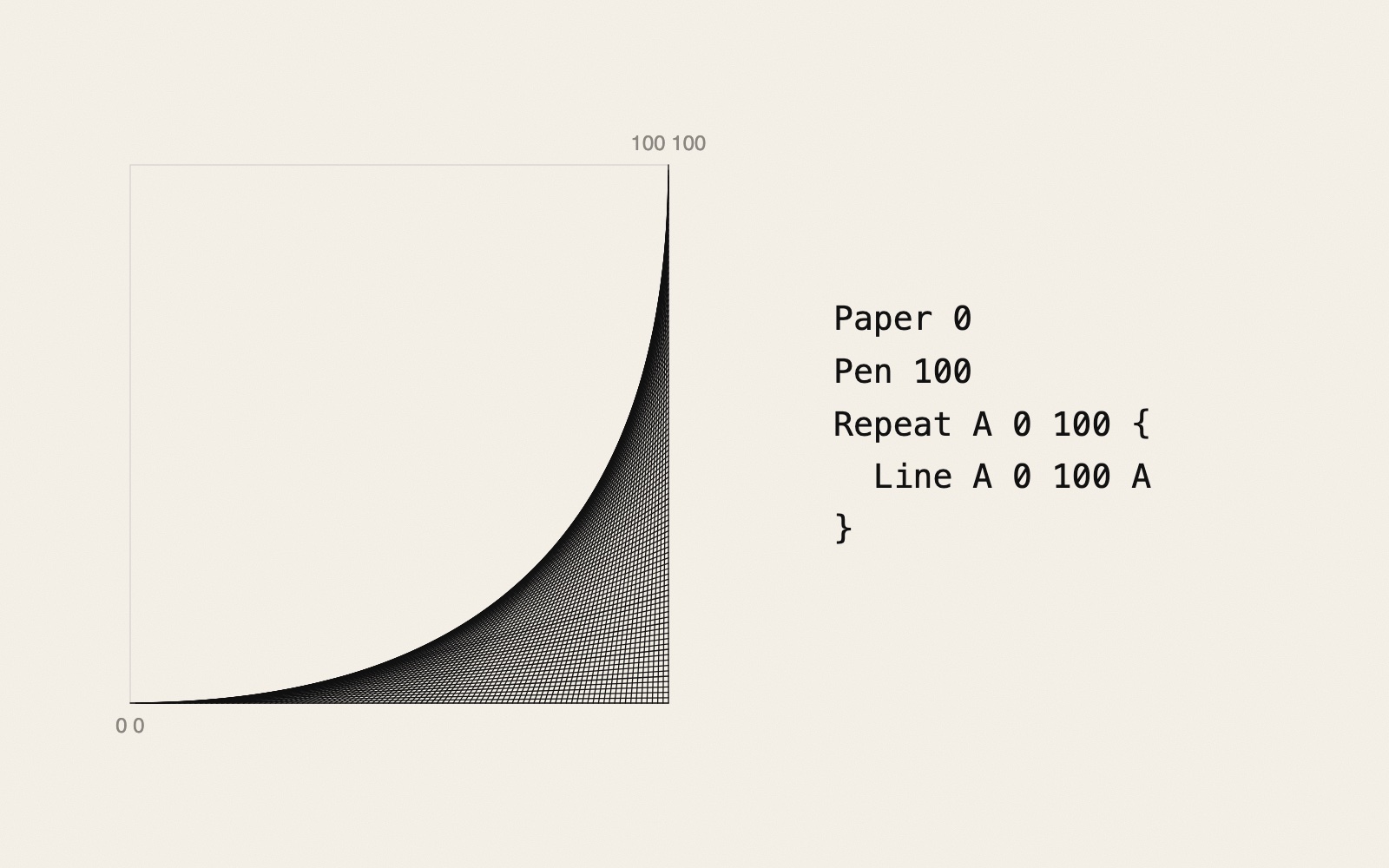
Design by Numbers (DBN) is a small programming language and editor that John Maeda made at the MIT Media Lab and released in 1999. It was meant for visual designers and artists who had never programmed: every program draws a picture, and the numbers lie, as a rule, between 0 and 100.1, 2, 3 It was also the direct ancestor of Processing.
Four commands
Maeda's own introduction starts with three commands, each followed by numbers:2
Paper 50covers the drawing area in 50% black, a middle grey.Paper 0is white,Paper 100black.Pen 100sets the pen to 100% black;Pen 0is a white pen.Line 0 0 100 100draws a line between two points, from the lower left corner (0 0) to the upper right corner (100 100).
The fourth, Repeat, runs the commands inside its braces again and again while a variable counts. In Maeda's example, Repeat A 0 100 { Pen A Line A 0 A 100 } draws 101 vertical lines, each a little darker than the one before, from white on the left to black on the right.2 The program in the picture above uses the same four commands: Line A 0 100 A joins a point moving along the bottom edge to a point moving up the right edge, and the 101 straight lines together make a curve.
On screen the drawing sat on the left and the program on the right, as in the picture.1 The language added variables and conditions to these drawing commands, but it was deliberately not a general-purpose language like C or Java.1 Ben Fry later called it "under-featured, and intentionally so".4
Live sketch
The project
DBN came with three parts: the software, which ran in a web browser or could be downloaded; a book, Design by Numbers, from MIT Press; and courseware for teachers.1 Maeda made version 1.0. Ben Fry made versions 2 and 3, and Casey Reas wrote the courseware; the last version, 3.0.1, is still offered on the MIT site.5
Maeda wrote in 2005 that he made DBN at a time when getting artists and designers to program "was just beginning to become in vogue", and that "The actual point of the book was to get more non-programmers to program as a means to hopefully realize how boring programming can be" – and then to imagine a better kind of programming.6 Fry and Reas, who looked after DBN, "felt that they had the right designs for a new solution". Processing, which they started in 2001, "grew directly out of" DBN.6, 3 Pen plotters take short commands with numbers telling them what to draw, as in HP-GL, much like DBN.
Sources
- “What is DBN?”. Design By Numbers, MIT Media Laboratory
“Design By Numbers was created for visual designers and artists as an introduction to computational design”; both a programming environment and a language; dot, line and field combined with variables and conditional statements; “Programs are written in the right half of the environment and displayed in the left”; not a general purpose language like C or Java; free, on the web, multilingual; core software, a book from MIT Press and courseware; Aesthetics and Computation Group, MIT Media Laboratory. - John Maeda, “An Introduction to DBN”. Design By Numbers, MIT Media Laboratory
Each command takes a number “generally between the range of 0 to 100”; “Paper 50” gives a 50% black paper; Pen gives the percentage of black; Line takes four numbers; “A line from the lower left corner (0 0) to upper right corner (100 100) would be 'Line 0 0 100 100'”; the example “Paper 0 Pen 100 Repeat A 0 100 { Pen A Line A 0 A 100 }”. - Ben Fry and Casey Reas, “Overview”. Processing.org
Processing “grew directly out of Maeda's Design By Numbers project, developed at the Media Lab and released in 1999”. - Liz Stinson, “Processing: the Software that Shaped Creative Coding”. AIGA Eye on Design, 28 October 2021
Fry on DBN: “under-featured, and intentionally so”; Processing's early editor reused DBN's interface. - “Design By Numbers”. MIT Media Laboratory, home page (last updated 2 August 2003)
DBN 3.0.1 runs from the website; “Benjamin Fry created DBN 3 and 2. DBN 1.0.1 was created by Tom White. The original version DBN 1.0 was created by John Maeda”; courseware by Casey Reas; other contributors Peter Cho, Elise Co, Lauren Dubick, Golan Levin, Jocelyn Lin, Josh Nimoy; points to Processing. - John Maeda, “Design By Numbers”. maedastudio.com, 2005
“I created Design By Numbers during in a time when getting artists and designers to program the computer was just beginning to become in vogue”; “The actual point of the book was to get more non-programmers to program as a means to hopefully realize how boring programming can be”; “The then voluntary caretakers of the DBN system, Ben Fry and Casey Reas felt that they had the right designs for a new solution. It is called Processing.”
- Published
- JAEV Notes, October 2026.
- Use
- Text CC BY 4.0. Free to use and quote with credit to JAEV and a link to this page. Images and quotations by others keep their own terms.
All texts as one file: archive.json - Cite
- JAEV Notes, “Design by Numbers (John Maeda, 1999)”, jaev.gallery/notes/design-by-numbers/, 2026.
- Corrections
- Additions and corrections are welcome: info@jaev.gallery
- Share
A link from your own site, course page or reading list helps others find it.- Follow
- New notes by RSS · Instagram · Bluesky
JAEV is a daemon taking shape: machines, weights, room, brain.