Line hatching for pen plotters
JAEV Notes · October 2026 · 3 min read
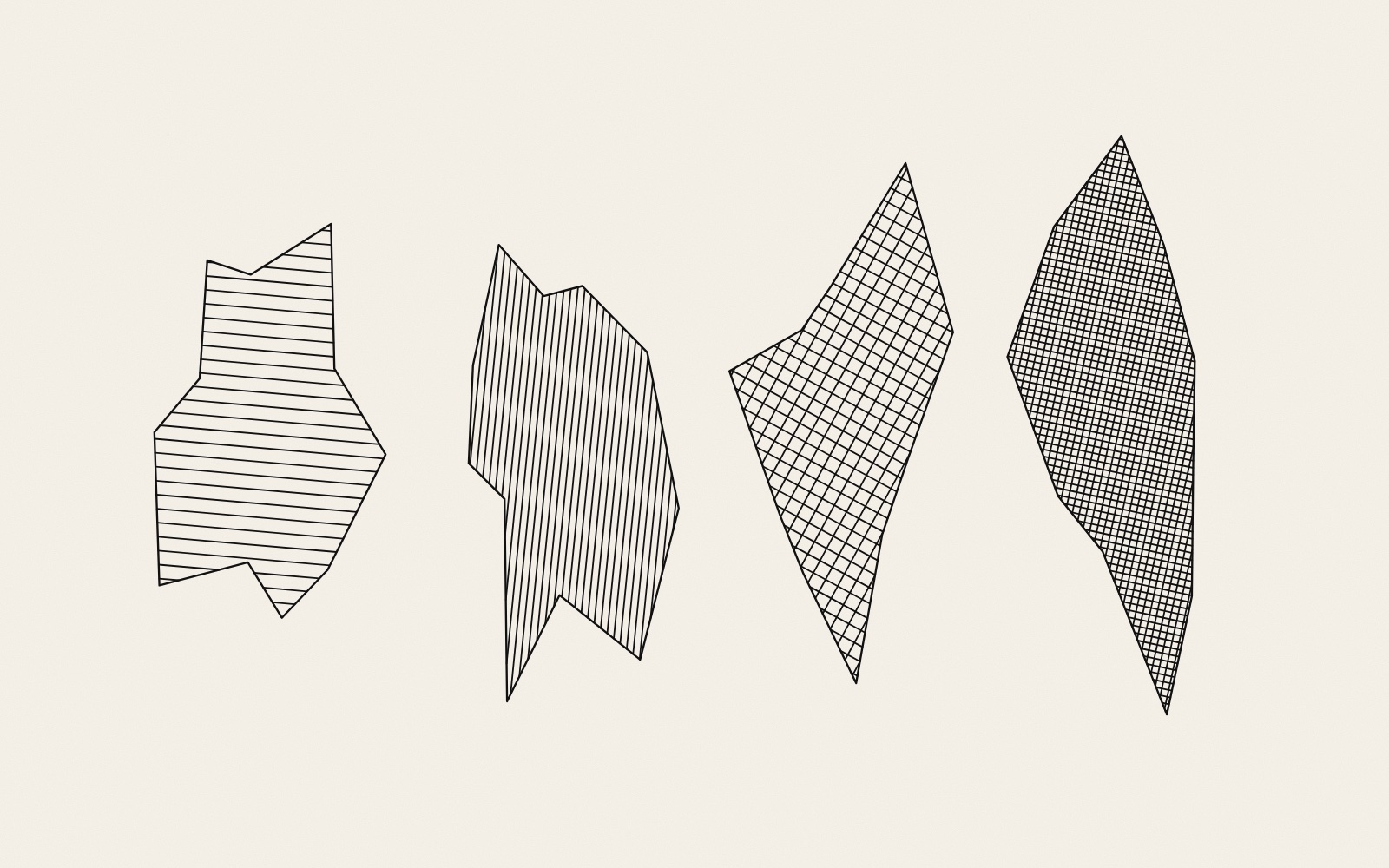
Hatching is the drawing and engraving technique of making tone with closely spaced parallel lines; when a second set of lines is laid at an angle to the first, it is called cross-hatching.1 For a pen plotter it is not a choice of style but the only way to make an area dark.
Why a plotter needs it
Instead of an image, a plotter is sent moves: lower the pen, go in a straight line to a point, lift the pen.2 A filled square in a drawing program becomes, for the plotter, only its outline, unless a program first turns the inside into lines. The editorial Plotter Art describes the whole chain, and the note on HP-GL the commands themselves.
How a fill is computed
The sketch below uses the scan-line method, in three steps:
- Turn the outline so that the hatch direction becomes horizontal.
- Cut it with horizontal lines, one for every step of the chosen spacing. For each line, find where it crosses the edges of the outline and sort the crossings from left to right. The pen is down between the first and second crossing, up between the second and third, down between the third and fourth, and so on. This even-odd rule also works for shapes that bend inwards or have holes.
- Turn the pieces back by the same angle.
Cross-hatching is the same fill run a second time at another angle, here 90 degrees.
Spacing, pen and tone
Two numbers set the tone: the width of the pen line and the distance between lines. Evil Mad Scientist's guide to its Hatch Fill extension for Inkscape says that the choice of spacing "will depend upon the thickness of the pen".3 As arithmetic, ignoring ink that spreads into the paper: a 0.3 mm line every 1 mm covers 30 per cent of the paper. A second set at the same spacing across it leaves 70 per cent of 70 per cent uncovered, so the cover rises to 51 per cent.
The order of the lines
If every line were drawn from left to right, the pen would travel back across the shape in the air after each one. Drawing every other line in the opposite direction, as the sketch does, removes most of that. Evil Mad Scientist's extension goes a step further: by default it "connects the ends of the hatch lines to make long wiggling paths that plot very efficiently".3 Sorting the lines of a whole drawing is the subject of the note on plotter path optimisation.
Hatching a photograph
The tool hatched, a plug-in for the plotter program vpype, turns an image into hatching. It divides the picture into black, dark, light and white zones at three brightness thresholds and fills each zone with a different density of lines, diagonal or circular.4, 5
At JAEV
In Olof Broström's Unverified Air, hatching carries data: nitrogen dioxide is drawn as red lines over the ground between the houses and ozone as blue lines over the roofs, "the lines growing closer as the values rise".6
Sources
- “Hatching”. Wikipedia
“an artistic technique used to create tonal or shading effects by drawing, painting, or scribing closely spaced parallel lines”; “When lines are placed at an angle to one another, it is called cross-hatching.” Engraving, etching, woodcut; Schongauer, Dürer. - Brian Schmalz, “EiBotBoard” (the controller of the EggBot and AxiDraw)
“This command … will cause the motors to move in a straight line between two points”. - “Hatch fill”. Evil Mad Scientist wiki
“performs the classic hatch and crosshatch fill operations on selected closed objects”; “The choice of value for the hatch spacing will depend upon the thickness of the pen”; “connects the ends of the hatch lines to make long wiggling paths that plot very efficiently”; inset option. - Drawingbots, hatched (library and vpype plug-in)
“convert images to plotter-friendly, hatched patterns”; levels: “Pixel value of the 3 thresholds between black, dark, light and white zones (0-255)”; option for circular hatches. - Antoine Beyeler, vpype
“The Swiss-Army-knife command-line tool for plotter vector graphics”. - Olof Broström, Unverified Air, 2026–2027. JAEV
“nitrogen dioxide as red lines over the open ground between the houses, ozone as blue lines over the roofs”, “the lines growing closer as the values rise”.
- Published
- JAEV Notes, October 2026.
- Use
- Text CC BY 4.0. Free to use and quote with credit to JAEV and a link to this page. Images and quotations by others keep their own terms.
All texts as one file: archive.json - Cite
- JAEV Notes, “Line hatching for pen plotters”, jaev.gallery/notes/line-hatching/, 2026.
- Corrections
- Additions and corrections are welcome: info@jaev.gallery
- Share
A link from your own site, course page or reading list helps others find it.- Follow
- New notes by RSS · Instagram · Bluesky
JAEV is a daemon taking shape: machines, weights, room, brain.