vpype: preparing SVG for a plotter
JAEV Notes · October 2026 · 2 min read
vpype is a free command-line program for preparing vector drawings for a pen plotter, written in Python by Antoine Beyeler. Its own description is "the Swiss-Army-knife command-line tool for plotter vector graphics".1 Version 1.0 was published in November 2020, under the MIT licence.2
What it is for
A drawing made by a program, saved as an SVG file, is usually not ready for a plotter. Its lines may be in the order the program happened to write them, broken into many pieces, or the wrong size for the paper. A plotter draws exactly what it is given, in that order, and lifts the pen for every jump between lines (see HP-GL). vpype rearranges the file before it goes to the machine: it lays the drawing out on a page, joins and sorts the lines, handles drawings in several layers for several colours, and can write the result for old plotters.1
How it works
vpype runs a pipeline of commands, each handing its result to the next:1
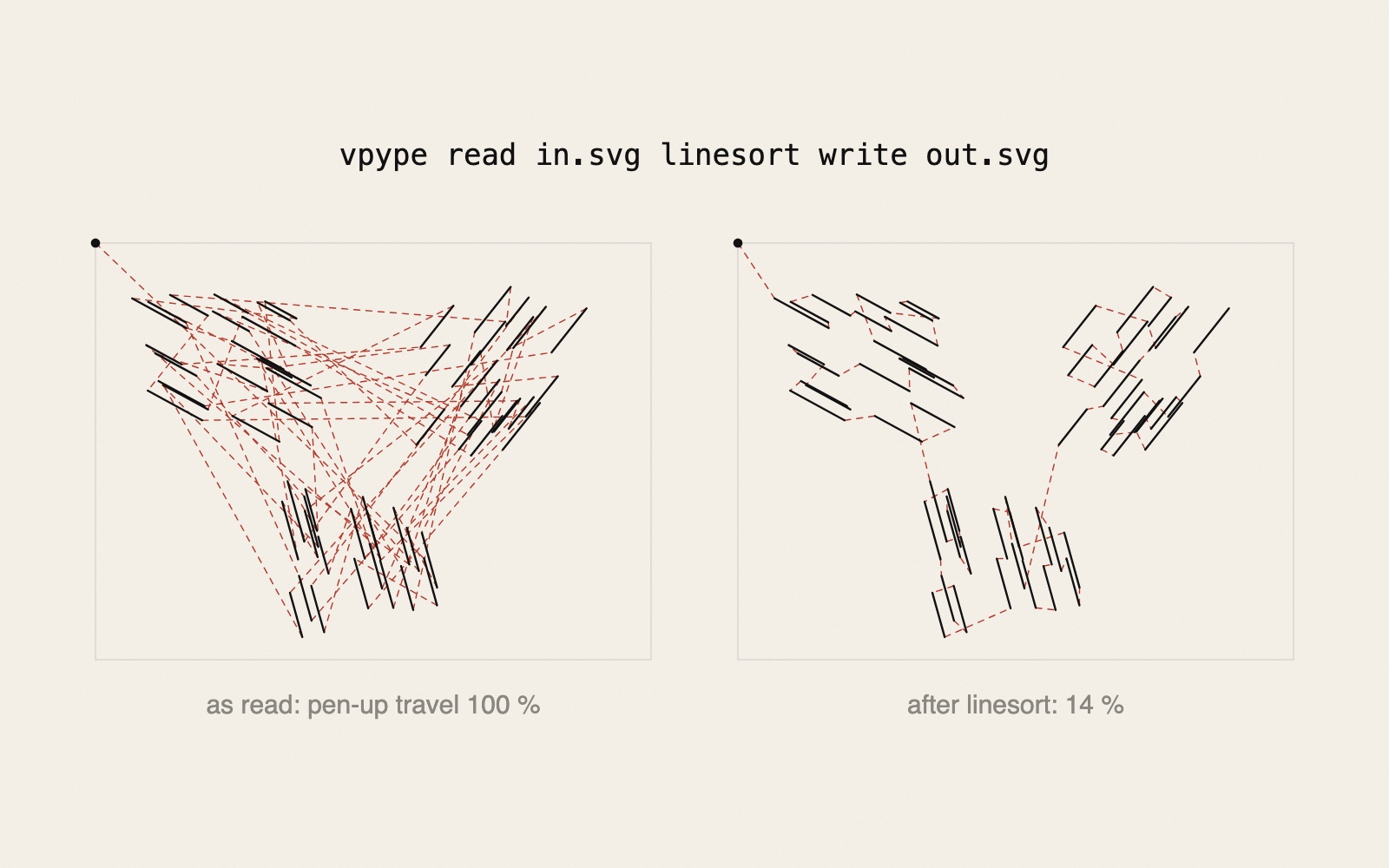
vpype read in.svg linemerge linesort write out.svg
read loads the lines from an SVG file. linemerge joins lines whose ends almost touch, by default when the gap is at most 0.05 mm, so the pen does not lift between them. linesort puts the lines in an order that makes the pen-up travel short. By default it uses "a fast, greedy algorithm", going each time to a nearby line and reversing a line's direction when that helps.1, 3 write saves the result. The documentation calls this kind of optimisation "quite possibly the most common use of vpype".4 The problem it solves is described in the note on plotter path optimisation; the diagram above shows the effect on sixty short lines.
vpype converts every curve, circle and Bézier into "lines made of small segments". For that reason it is not meant for general illustration or print work.1
HP-GL for old plotters
If the output file ends in .hpgl, vpype writes HP-GL instead of SVG. Because "HPGL coordinate systems vary widely from plotter to plotter", the plotter must be named with --device.4 Built-in profiles include the HP 7475A as well as Roland's DXY and Sketchmate.3 Other plotters can be added in a configuration file.4 Newer machines need no HP-GL: the AxiDraw's own software plots SVG files.5
Plug-ins and vsketch
vpype can be extended with plug-ins. Among those listed in its README are hatched, which fills areas with hatching (see line hatching), and occult, which removes hidden lines. Beyeler's vsketch, a framework for writing plotter drawings in Python, is built on vpype.1
Olof Broström's Unverified Air at JAEV is stored as files for a pen plotter, in black, red and blue ink.6 The wider field is in JAEV's text on plotter art.
Sources
- vpype, README. GitHub (abey79/vpype)
“the Swiss-Army-knife command-line tool for plotter vector graphics”; layout, optimise, “create HPGL output for vintage plotters”, generative artwork, multi-layer files; pipelines of commands: read, linemerge, linesort, crop, write; “converts everything curvy (circles, bezier curves, etc.) to lines made of small segments”; plug-ins such as hatched and occult; vsketch “is built upon vpype”; MIT License. - vpype. Python Package Index
Author Antoine Beyeler; version 1.0.0 uploaded 29 November 2020; MIT licence. - “Command reference”. vpype documentation
linesort: “Sort lines to minimize the pen-up travel distance”, “By default, a fast, greedy algorithm is used”, --no-flip, --two-opt; linemerge: “By default, gaps of maximum 0.05mm are considered for merging”; reloop: “Randomize the seam location of closed paths”; write: devices “hp7475a, designmate, hp7440a, artisan, dmp_161, hp7550, dxy, sketchmate”. - “Cookbook”. vpype documentation
Optimising files is “quite possibly the most common use of vpype”; “For vintage plotters, the write command is capable of generating HPGL code instead of SVG”; “HPGL coordinate systems vary widely from plotter to plotter”; plotter profiles in a TOML configuration file. - AxiDraw. axidraw.com
“AxiDraw is normally controlled through a set of extensions to Inkscape”; “Two APIs for python. One is equivalent to the CLI software in that it plots SVG files.” - Olof Broström, Unverified Air, 2026–2027. JAEV
“Every drawing is shown here as an image and stored as a file for a pen plotter, in black, red and blue ink”.
- Published
- JAEV Notes, October 2026.
- Use
- Text CC BY 4.0. Free to use and quote with credit to JAEV and a link to this page. Images and quotations by others keep their own terms.
All texts as one file: archive.json - Cite
- JAEV Notes, “vpype: preparing SVG for a plotter”, jaev.gallery/notes/vpype/, 2026.
- Corrections
- Additions and corrections are welcome: info@jaev.gallery
- Share
A link from your own site, course page or reading list helps others find it.- Follow
- New notes by RSS · Instagram · Bluesky
JAEV is a daemon taking shape: machines, weights, room, brain.